Mugipayu: A Unique Handwritten Font for Web Design
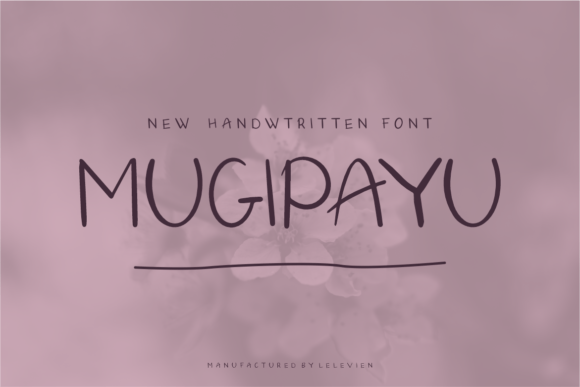
Working on a boutique online store project, I was looking for a font that could add personality to the hero section without overshadowing the product images. Mugipayu caught my eye—it’s a cool and unique handwritten font that feels both modern and personal. Its neat craftsmanship and high level of detail made it stand out in a sea of generic script fonts.
The first thing I noticed about Mugipayu is its character. It has a friendly, approachable vibe that works well for brands aiming to connect with their audience on a more human level. The strokes are clean but still have that organic feel of real handwriting, which gives it a sense of authenticity. It’s not too ornate, so it doesn’t distract from the overall design, but it still adds visual interest where needed.
Testing Mugipayu in Real Layouts
I started by placing Mugipayu over an image banner for the homepage. The font’s fluidity complemented the soft, natural tones of the background. It didn’t clash with the image, and it added a subtle layer of personality that made the page feel more dynamic. I then tried it in the hero section as a headline. The font’s curves and spacing gave it a polished look that felt just right for a creative brand.
Next, I tested it on mobile screens. Mugipayu holds up well at smaller sizes, but I found that it works best for short phrases rather than long paragraphs. For body text, it’s better to pair it with a simpler sans serif or serif font to ensure readability. Still, as a display font, it shines in headings, buttons, and call-to-action areas where it can make a strong visual impact.
Where to Use Mugipayu in Web Design
Mugipayu is ideal for headers, section titles, and decorative accents. On a coaching website, I used it for the main title of a course sales page. It gave the page a warm, inviting tone that matched the brand’s message. In a portfolio site, it worked well for the project titles, adding a personal touch without overwhelming the viewer.
For a digital brand kit, Mugipayu was perfect for logo design and social media graphics. Its handwritten style gave the brand a more intimate and creative identity. When paired with a simple sans serif for body copy, it created a balanced and professional look that felt cohesive across different platforms.
Readability and User Experience Considerations
When using Mugipayu, it’s important to consider how it performs in different contexts. On dark backgrounds, it remains legible, but on light backgrounds, it can sometimes appear too thin. I adjusted the line height and spacing to improve clarity, especially for mobile users who might be browsing on smaller screens.
Image overlays also require careful handling. If the background is busy, Mugipayu can get lost unless it’s given enough contrast. I found that using a semi-transparent overlay or adjusting the font color helped maintain visibility without sacrificing the aesthetic appeal of the design.
Font Pairing and Design Integration
One of the strengths of Mugipayu is its versatility. It pairs well with other fonts, especially when used as a display typeface. For example, combining it with a clean, modern sans serif like Open Sans creates a nice contrast that enhances visual hierarchy. This pairing works great for landing pages, blog headers, and product banners.
If the goal is to create a more editorial feel, pairing Mugipayu with a serif font like Georgia or Playfair Display can add a refined and sophisticated touch. This combination is ideal for blogs, portfolio sites, and content-driven websites where storytelling is key.
Practical Tips for Using Mugipayu
Before implementing Mugipayu on a website, check the available styles, weights, and file formats. Make sure the font includes all necessary glyphs for the languages you’ll be using. Also, verify the commercial licensing terms to ensure it’s suitable for your project, whether it’s for a client, an online store, or a digital template.
For responsive layouts, test Mugipayu at different screen sizes to ensure it scales properly. Avoid using it for long blocks of text, and instead use it for headlines, logos, and short phrases. This will help maintain a clear visual hierarchy and keep the user experience smooth and intuitive.
Overall, Mugipayu is a valuable addition to any web designer’s toolkit. Its unique style and attention to detail make it a great choice for projects that need a personal, creative touch. Whether you’re building a boutique online store, a coaching website, or a digital brand kit, Mugipayu can help elevate your design and bring your vision to life.
As a web designer, I appreciate fonts that offer both beauty and functionality. Mugipayu delivers on both fronts, making it a standout option for anyone looking to enhance their digital presence with a custom, handwritten feel.